The best free text to speech Chrome extensions, and what they can see
Every review of these extensions talks about voices. Almost none mention what you hand over when you press Add to Chrome. We took the 13 text to speech extensions the Chrome Web Store shows first, downloaded each published package, read the permissions it asks for, and lined them up with users, ratings and the date of the last update. Then we picked the best free one for each kind of reader.
The short answer
- Best free overall
- Read Aloud. 6,000,000 users, updated October 26, 2026, and it only asks for the tab you click it on.
- Most private
- Talkie. Open source, the shortest permission list we found, and it speaks with your computer’s own voices.
- Ebooks and PDFs, no sign up
- Read It To Me. Free, no account, 60+ built-in voices, tab-only access.
- Offline
- Voice Out, whose free offline voices keep reading without internet, or Talkie.
- Natural voices for free
- NaturalReader: premium voices 20 minutes a day free, but it can read every site you visit.
- No install at all
- Chrome’s reading mode: right-click a page, Open in reading mode, press Play.
All 13 extensions, compared
Users, rating and last update from each Chrome Web Store listing; access from each package; data handled from each listing’s privacy disclosure. All read on October 27, 2026.
| Extension | Users | Rating | Updated | Can read | Data it says it handles |
|---|---|---|---|---|---|
| Read Aloud | 6,000,000 | 3.8 (3.6K) | Oct 26, 2026 | Tab you click. The tab you click, plus translate.google.com | Personally identifiable info, authentication info, website content |
| Speechify | 1,000,000 | 4.5 (22.7K) | Oct 17, 2026 | Every site. Every site, files you open in Chrome, tab capture | Personally identifiable info, website content |
| NaturalReader | 1,000,000 | 4.1 (2.4K) | Sep 21, 2026 | Every site. Every site, page navigation, tabs | Personally identifiable info |
| Read Aloud TTS | 600,000 | 4.2 (3.2K) | Oct 5, 2026 | Every site. Every site, tabs | Personally identifiable info, web history |
| Text to Speech (TTS) | 60,000 | 3.1 (38) | Oct 20, 2025 | Every site. A script on every site | Declares it collects nothing |
| Readvox | 50,000 | 4.0 (275) | Jul 28, 2026 | Every site. Every site, CPU and memory info | Declares it collects nothing |
| Voice Out | 50,000 | 4.1 (191) | Sep 14, 2026 | Tab you click. The tab you click, plus Google Docs and its own site | Declares it collects nothing |
| Talkie | 50,000 | 3.3 (171) | Jun 25, 2026 | Tab you click. The tab you click, nothing else | Declares it collects nothing |
| Read It To Me | 30,000 | 4.3 (94) | Sep 30, 2026 | Tab you click. The tab you click, plus translate.google.com | Personally identifiable info, user activity, website content |
| AIVocal | 10,000 | 4.6 (110) | Sep 11, 2025 | Every site. A script on every site, downloads | Location, user activity |
| Text to Speech, AI Voice Generator & TTS | 1,000 | 3.8 (13) | Oct 22, 2025 | Tab you click. The tab you click, nothing else | Declares it collects nothing |
| Read&Write for Google Chrome | Not shown | 2.4 (1.6K) | Oct 22, 2026 | Every site. Every site, your Google email, your other extensions | Personally identifiable info, user activity, website content |
| FreeTTS (ours) | 192 | 5.0 (5) | Aug 24, 2026 | Tab you click. The tab you click, plus freetts.org | Authentication info, web history, website content |
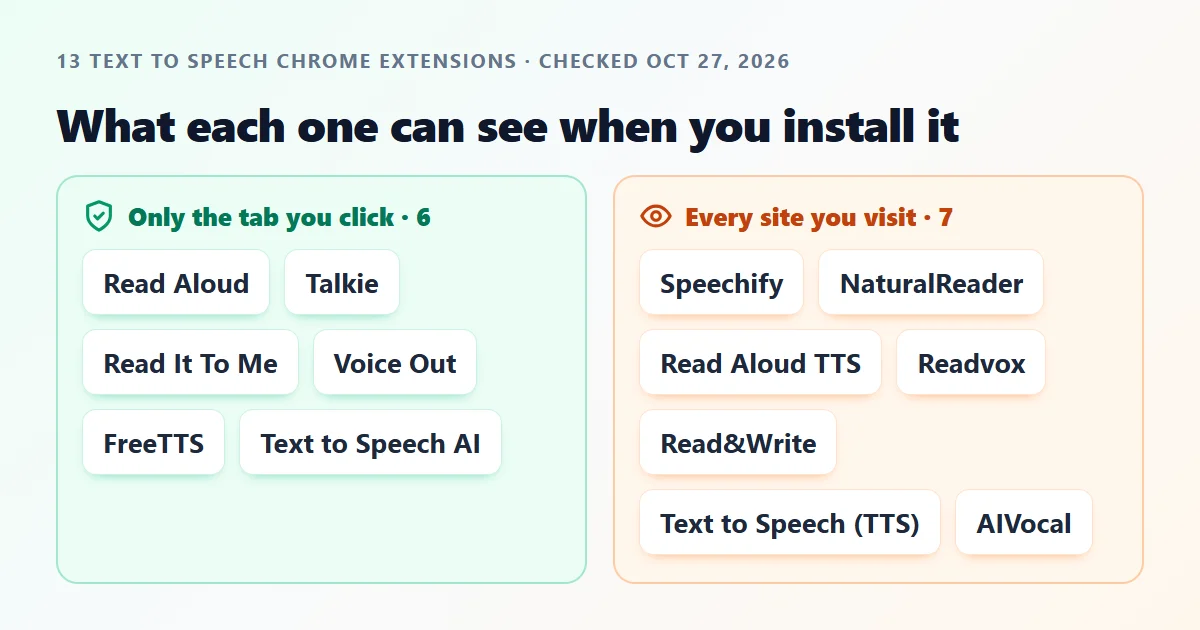
“Tab you click” means Chrome’s activeTab permission: the extension can only see a page after you click it there. “Every site” means it asks for access to all URLs or loads its own script into every page you open. Ratings are shown as the store shows them, with the number of ratings in brackets.
What “read and change all your data on all websites” means
When an extension asks for access to all URLs, Chrome shows a warning at install: Read and change all your data on all websites. Most people click past it. It means the extension can see the content of every page you open, your email, your bank, your documents, whenever it chooses, not only when you ask it to read something.
A text to speech extension does not need that. Chrome has a permission built for exactly this job, activeTab: the extension gets access to a page only at the moment you click it there, and Chrome shows no scary warning at install. Read Aloud, the most installed reader in the store, works this way. So do Talkie, Read It To Me, Voice Out and our own.
A permission is not proof of misuse. Big extensions ask for broad access because it makes features easier: reading inside Google Docs, a floating player on every page, or a button that appears without a click. The question is whether you want that trade. Some packages go further: Speechify also asks for files you open in Chrome (Chrome only grants this if you switch on Allow access to file URLs) and for capturing a tab’s audio and video; Read&Write asks for your Google account email and the ability to manage your other extensions.
The best free text to speech extensions, reviewed
Ranked for a free user who cares about privacy as much as voices. Quotes are each developer’s own words from its listing.
Read Aloud: Best free extension for most people
6,000,000 users . 3.8 stars (3.6K) . updated Oct 26, 2026 . tab you click only . Chrome Web Store
The most installed text to speech extension in the store, with 6,000,000 users, and it was updated the day before we checked. It reads the article on the page you are on with one click, using the voices already in your browser and computer, in what its listing calls “40+ languages”.
Its package asks for very little: the tab you click it on, Google Translate, and Chrome's own speech features. It cannot quietly read the other sites you visit. The listing also says it can read PDFs, Google Docs, Google Play Books and Kindle.
Watch out: The natural sounding cloud voices are not free: “Cloud-based voices may require additional in-app purchase or bringing your own API key to enable.” Its 3.8 rating is the lowest of the big four.
Talkie: Most private
50,000 users . 3.3 stars (171) . updated Jun 25, 2026 . tab you click only . Chrome Web Store
Talkie is open source (GPL-3.0, says its listing) and asks for the smallest set of permissions in our test: the tab you click, a right-click menu item, storage, and nothing that reaches other sites. It speaks with your system's own voices through the browser's built-in speech engine, so nothing you read has to leave your computer.
Its listing promises “no unnecessary tracking or external services”, and its privacy disclosure says it collects no data. Shortcut keys (Ctrl+Shift+A on Windows, Linux and ChromeOS) start and stop reading without touching the mouse.
Watch out: It sounds exactly as good as the voices installed on your computer, no better. On Windows 11, new voices come from Settings, Time and language.
Read It To Me: Best for ebooks and PDFs with no sign up
30,000 users . 4.3 stars (94) . updated Sep 30, 2026 . tab you click only . Chrome Web Store
It reads web pages, PDFs and ebooks inside the browser, highlights the current sentence, and starts with “60+ free voices built into your browser and system”. Asked whether it is free, its FAQ answers that “it costs nothing and no sign-up is needed”.
Like Read Aloud, it only asks for the tab you click and Google Translate. If you have your own key from a premium voice provider, you can connect it, and the listing says the key stays on your device.
Watch out: Its privacy disclosure lists personally identifiable information, user activity and website content as data it handles, more than its small permission list suggests.
Voice Out: Best for reading offline
50,000 users . 4.1 stars (191) . updated Sep 14, 2026 . tab you click only . Chrome Web Store
Voice Out is “free to use with standard and offline voices”, claims 130+ voices in 30+ languages, and its free offline voices “keep reading even without an internet connection”. There is a PDF viewer on its own site that reads along with highlighting.
Its permissions are narrow: the tab you click, plus Google Docs, Google Translate, Google Cloud and its own site. It says it collects no data.
Watch out: Its published package still lists http://localhost:8000, a developer's local test address. Harmless on your machine unless something runs there, but it is a sign of a rushed release.
NaturalReader: Best free tier with natural voices
1,000,000 users . 4.1 stars (2.4K) . updated Sep 21, 2026 . can read every site . Chrome Web Store
NaturalReader spells out its free plan better than anyone: “You can listen with the Free Voices unlimitedly, Premium Voices for 20 minutes per day, and Plus Voices for 5 minutes per day.” It claims 150+ voices across 20+ languages, works on Gmail, Outlook, Google Docs, PDFs and Kindle, and lists “Download to MP3” among its features.
1,000,000 users and a 4.1 rating from 2,400 reviews. The same account opens its web reader and mobile app.
Watch out: The trade: its package asks to read and change every site you visit, injects a script into every page, and can see your page navigation and tabs.
Speechify: Best if you will pay and live in Google Docs
1,000,000 users . 4.5 stars (22.7K) . updated Oct 17, 2026 . can read every site . Chrome Web Store
The polished one: 1,000,000 users, a 4.5 rating from 22,700 reviews (the most reviewed extension here), “1000+ lifelike voices across 60+ languages, at up to 4.5x speed”, a floating player, and one subscription across devices. It reads Google Docs, PDFs, web pages and books.
On iPhone, Speechify's top in-app purchases include Premium at $139.99 and Premium Monthly at $11.99 (App Store, 27 October 2026); the extension uses the same account.
Watch out: Its package asks for the most of anything we checked: every site over http and https, files you open in Chrome, a script in every page, permission to capture a tab's audio and video, CPU and memory information, and unlimited local storage. The package is 23 MB.
Read&Write for Google Chrome: Only if your school pays for it
User count not shown . 2.4 stars (1.6K) . updated Oct 22, 2026 . can read every site . Chrome Web Store
Texthelp's reading and writing toolbar is built for schools and offices: text to speech plus support tools that, in its listing's words, make “documents, web pages and common file types in Google Drive (including: Google Docs, PDF & ePub) more accessible”. If your school pays for a licence, it is usually set up for you.
Watch out: As a free install it rates 2.4 from 1,600 reviews, and it asks for every site, your Google account email, and the ability to manage your other extensions. The package is 135 MB.
FreeTTS: Best for saving the audio as an MP3 (we make it)
192 users . 5.0 stars (5) . updated Aug 24, 2026 . tab you click only . Chrome Web Store
Our own extension, so weigh this one accordingly. Select text and right-click, or send the whole article to the player and keep browsing; the audio can be downloaded. It asks for the tab you click, downloads, and freetts.org, and nothing that reads other sites.
It has 192 users, which is honest about where we stand next to Read Aloud. If all you need is a file, the text to MP3 converter on our site does the same without installing anything.
Watch out: Its privacy disclosure lists authentication info, web history and website content: it signs you in to your FreeTTS account and sends the text you choose to our servers to be read.
You may not need an extension at all
Chrome reading mode. On a computer, right-click any article and choose Open in reading mode. A side panel opens with the text; press Play to hear it, change the voice and speed, and turn highlighting on or off. It is part of Chrome, so it asks for nothing (Google’s guide).
ChromeOS Select-to-speak. On a Chromebook, turn it on in the accessibility settings, select text, and it reads it. Schools that need more can read our Chromebook text to speech guide.
Microsoft Edge Read Aloud. If you are not tied to Chrome, Edge reads pages aloud with natural voices out of the box, and it is free.
A file instead of a voice. If you want to listen later, in the car or on a walk, an extension is the wrong tool. Paste the text into our text to MP3 converter and keep the file.
How to limit what any extension can see
1. Type chrome://extensions in the address bar and press Enter.
2. Find the extension and press Details.
3. Under Site access, choose On click. The extension now sees a page only after you click its icon there, the same as an activeTab extension.
4. If it stops working on a site you use every day, add that one site under On specific sites instead of going back to all sites.
Honest limits of this review
We judged what each extension asks for and what its developer says it does. We did not buy paid plans, and we did not run each extension’s code to watch what it sends. A broad permission list is a risk, not a finding of wrongdoing. User counts and ratings change daily, and an update can change permissions; the date on this page is the date of our snapshot.
We make one of these extensions. We put it last in the picks, marked it as ours, and showed its user count of 192 next to Read Aloud’s 6,000,000.
Which one to install
Just want web pages read aloud
Install Read Aloud, or use Chrome’s reading mode and install nothing.
Privacy first
Talkie. It cannot see other sites, and it speaks with your own computer’s voices.
Docs, PDFs and premium voices
NaturalReader’s free tier or a paid Speechify plan, knowing both can read every site you visit.
Text to speech extension questions
Of the 13 text to speech extensions the Chrome Web Store showed first on October 27, 2026, 7 asked to read and change every site the user visits. The most installed, Read Aloud with 6,000,000 users, asked only for the tab the user clicks it on.
Where the facts come from
Our check
Each extension’s published package, downloaded from Google’s update server on October 27, 2026; only manifest.json was read.
Chrome Web Store
Read Aloud, Speechify, NaturalReader, Read Aloud TTS, Text to Speech (TTS), Readvox, Voice Out, Talkie, Read It To Me, AIVocal, Text to Speech, AI Voice Generator & TTS, Read&Write for Google Chrome, FreeTTS (ours). Users, ratings, update dates, descriptions and privacy disclosures.
Chrome for Developers
Google Chrome Help
App Store
Speechify for iPhone, for its in-app purchase prices.