The best free text to speech apps for iPhone and Android, and what free really means
Every app on this list is free to download. Very few are free to use the way their screenshots suggest. We took the text to speech apps the App Store and Google Play show first, and on the same day read each one’s rating, its real in-app prices, Apple’s privacy label and Google’s data safety section. Start with the reader your phone already has; then here is what each app costs, and what it collects.
The short answer
- Best free, any phone
- The reader you already have: Speak Screen on iPhone, Select to Speak on Android. Free, every app, nothing to install.
- Best free app, iPhone
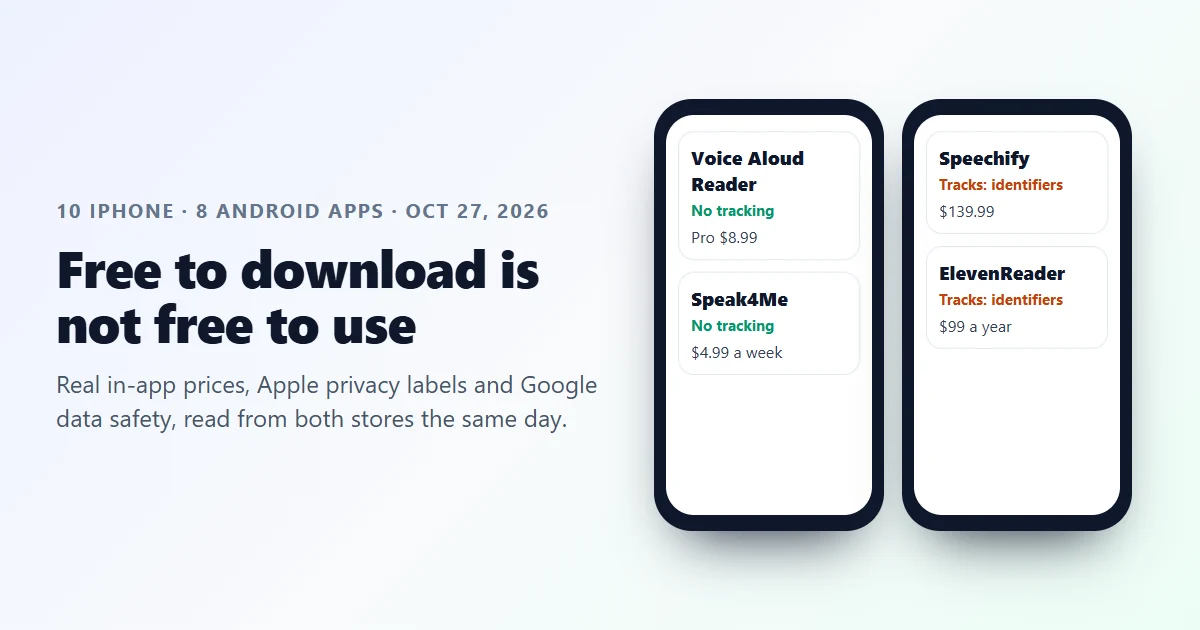
- Voice Aloud Reader. 4.63 stars, no tracking on its privacy label, free with ads; Pro is $8.99.
- Best free app, Android
- @Voice Aloud Reader. 10 million plus installs, says it collects no data, shows ads.
- Most natural voices
- ElevenReader. 4.72 on iPhone; unlimited text to speech is $11 a month or $99 a year.
- No account, no ads
- NaturalReader, by its own description, with MP3 downloads.
- Not free at all
- Voice Dream: “A subscription is required to access the app.”
10 iPhone text to speech apps, compared
Rating, size and last update from Apple’s own App Store data; paid options from each app’s list of top in-app purchases; tracking from its privacy label. All read on October 27, 2026.
| App | Rating | Size | Updated | Paid options shown | Data used to track you |
|---|---|---|---|---|---|
| Speechify Speechify Inc. | 4.66 (527,417) | 557 MB | Oct 20, 2026 | Premium Monthly $11.99; Premium $139.99 | Yes: identifiers |
| Text to Speech! Gwyn Durbridge | 4.64 (33,420) | 79 MB | Oct 7, 2026 | Remove Advertisements $9.99 | Yes: location, identifiers, usage data, diagnostics |
| Voice Aloud Reader Marcin Olawski | 4.63 (18,820) | 78 MB | Aug 28, 2026 | Pro version $8.99 | No |
| Voice Dream Voice Dream LLC | 4.48 (14,422) | 280 MB | Aug 18, 2026 | Subscription required: $4.99 a month or $79.99 a year | Yes: identifiers, usage data |
| Speak4Me MIRO CONSULTING SRL | 4.54 (13,702) | 75 MB | Oct 23, 2026 | Pro Weekly $4.99; Pro Yearly $39.99 | No |
| ElevenReader Eleven Labs Inc. | 4.72 (10,981) | 126 MB | Oct 15, 2026 | Plus $10 a month; Ultra $11 a month or $99 a year | Yes: identifiers |
| Narrator's Voice Escolha Tecnologia | 4.55 (10,539) | 124 MB | Oct 23, 2026 | Remove ads $9.99; Premium Weekly $4.99 | Yes: identifiers |
| NaturalReader NaturalSoft | 4.55 (9,168) | 70 MB | Oct 26, 2026 | Premium $9.99 a month or $59.99 a year | Yes: identifiers |
| Peech Dopefin Limited | 4.40 (8,927) | 110 MB | Oct 19, 2026 | Peech Premium from $3.99 | Yes: identifiers |
| FreeTTS (ours) Outline Technologies LLC | 5.0 (1) | 31 MB | Oct 1, 2026 | PRO $19.99 a month, $149.99 a year, $199.99 for life | No |
“Paid options shown” are taken from the top in-app purchases the App Store lists for each app, which can include several prices for the same plan. Rating counts are Apple’s, in brackets.
8 Android text to speech apps, compared
Rating, reviews, installs, ads and in-app purchases from each Google Play page; sharing and collection from its data safety section. Read on October 27, 2026.
| App | Rating | Installs | Ads | In-app purchases | Shares data with other companies | Collects data |
|---|---|---|---|---|---|---|
| Speechify | 4.0 (286K) | 10M+ | No | Yes | None declared | Yes, starting with your name |
| @Voice Aloud Reader | 4.3 (138K) | 10M+ | Yes | No | None declared | No data collected |
| Text to Speech (Readout) | 4.7 (82.9K) | 5M+ | Yes | Yes | Yes: crash logs and diagnostics | Yes |
| ElevenReader | 4.5 (70.4K) | 1M+ | No | Yes | Yes: app activity | Yes, including files and docs (optional) |
| Text Reader: Text to Speech | 4.5 (68K) | 5M+ | Yes | Yes | None declared | No data collected |
| NaturalReader | 4.3 (60.4K) | 5M+ | No | Yes | Yes: device or other IDs | Yes |
| Text To Speech TTS Reader AI | 4.4 (44.8K) | 5M+ | Yes | Yes | None declared | Yes: device or other IDs, for advertising |
| FreeTTS (ours) | No rating yet | 100+ | No | Yes | None declared | Yes, including optional voice recordings |
Data safety answers are written by each developer and are not verified by Google. “None declared” means the section lists nothing shared with other companies.
The best free text to speech apps, reviewed
Ranked for someone who wants to listen for free and keep their data. Quotes are each developer’s own words from its store listing.
The reader already on your phone: Best free option, full stop
iPhone and Android
On an iPhone, open Settings, Accessibility, Spoken Content, and switch on Speak Screen and Speak Selection. Swipe down from the top of any screen with two fingers and the phone reads the whole page; select text and tap Speak for a single passage. It is free, works in every app, and installs nothing.
On Android, turn on Select to Speak under Settings, Accessibility, then tap its icon and the text you want read. Google's own Reading mode app adds a cleaner reading view with play controls. The speech engine behind both, Google's Speech Recognition and Synthesis, has more than 10 billion installs.
Watch out: The built-in voices are good, not the best. And Google's Reading mode app rates only 2.7 on Google Play, from 6,140 reviews.
Voice Aloud Reader: Best free reader app on iPhone
iPhone
4.63 stars from 18,820 ratings, and one of only three apps in our iPhone list whose privacy label shows no data used to track you. In its own words it “reads aloud text documents, e-books, websites, and printed books”, and its listing calls out support for VoiceOver, Larger Text and Reduced Motion.
It is free with ads. The paid upgrade is the Pro version at $8.99, which reviewers describe as a one-time payment; premium voices are a monthly add-on ($9.99 for Pro plus premium voices for a month).
Watch out: Several reviewers mention a free listening limit that asks you to watch an ad or upgrade. Not the same developer as @Voice Aloud Reader on Android, despite the similar name.
@Voice Aloud Reader: Best free reader app on Android
Android
More than 10 million installs and 4.3 stars from 138,000 reviews. Its Google Play data safety section says it collects no data, and it sells no in-app purchases at all.
In its words, it “reads PDFs, eBooks, web pages, documents, and pasted text in dozens of languages”, and a free browser extension sends a page from your computer to your phone to finish listening on the go.
Watch out: It is paid for by ads.
ElevenReader: Most natural voices
iPhone and Android
From the company behind ElevenLabs. The best rated big app in our list on iPhone (4.72 from 10,981 ratings) and 4.5 on Android. It reads books, articles and your own documents, with offline listening and voices you can design yourself.
In its own words, “unlimited TTS” comes with ElevenReader Ultra: $11 a month or $99 a year on iPhone. There is also a Plus plan at $10 a month and 10 hour packs for $5.
Watch out: Its Apple label lists identifiers used to track you, and on Android it declares that it shares app activity with other companies.
NaturalReader: Free with no account and no ads
iPhone and Android
Its iPhone listing promises “No account required to start listening” and “a completely ad-free experience”, opens PDF, Word, PowerPoint, EPUB and files from Google Drive, Dropbox and OneDrive, and lists “Download MP3” for offline listening.
Paid plans start with Premium at $9.99 a month or $59.99 a year. 5 million plus installs on Android.
Watch out: On iPhone its label lists identifiers used to track you; on Android it declares sharing device or other IDs.
Speechify: Most popular, and the priciest
iPhone and Android
527,417 ratings on iPhone, by far the most of any app here, and 10 million plus installs on Android. Polished and fast, with what it calls “hundreds of timeless audiobooks for free” included.
Its top in-app purchases on iPhone include Premium at $139.99 and Premium Monthly at $11.99.
Watch out: At 557 MB it is the largest app in our list, seven times the size of most readers. The best voices are behind the subscription.
FreeTTS: Best for making audio files (we make it)
iPhone and Android
Our own app, so judge accordingly. It is built to make audio, not to read along: 2,253 voices in 149 languages, and the result saved as a file you can share or put in a video. Its iPhone label shows no data used to track you.
It is new: one rating on iPhone and 100 plus installs on Android. PRO is $19.99 a month, $149.99 a year or $199.99 for life.
Watch out: If you only want to listen to articles, the built-in readers or Voice Aloud Reader are simpler.
The subscription trap
Free trials in text to speech apps usually roll into a plan, and the plan you get is the one on the first screen. Two apps in our list sell weekly plans: Speak4Me (Pro Weekly, $4.99) and Narrator’s Voice (Premium User, Weekly, $4.99). Left running, $4.99 a week is $259.48 a year. Speak4Me’s own yearly plan is $39.99.
Voice Dream, the long time favourite of many dyslexic readers, is no longer free at all: its description says “A subscription is required to access the app”, with a free trial for new users, and its top in-app purchases are $4.99 a month and $79.99 a year.
The simplest models we found were single upgrades: Voice Aloud Reader’s Pro version at $8.99, which its reviewers describe as a one-time payment, and Text to Speech!, whose only purchase is Remove Advertisements at $9.99.
How to read an app’s privacy label
On iPhone, scroll an app’s App Store page to App Privacy. Apple’s label has up to three boxes. “Data Used to Track You” is the one to look at: by Apple’s definition, tracking means linking data from the app with data from other companies’ apps and websites for advertising, or sharing it with data brokers. Text to Speech! lists location, identifiers, usage data and diagnostics there. Voice Aloud Reader, Speak4Me and FreeTTS have no such box at all.
On Android, open the app’s Google Play page and tap Data safety. It shows what the developer says it shares with other companies and what it collects. Those answers are the developer’s own; Google says so on the page.
Labels describe the app as a whole. A reader that uploads your documents to read them in the cloud has to send the text somewhere; one that only uses the phone’s own voices may not need to. If your files are private, prefer the built-in readers or an app that reads on the device.
Honest limits of this review
Everything here is read from the two app stores and Apple’s official API on October 27, 2026: ratings, sizes, update dates, in-app purchase prices, privacy labels and data safety answers. We did not pay for any plan, and we did not judge voices by ear across apps. Prices are US App Store prices and change by country.
We make one of these apps. It is marked as ours, sits last among the picks, and its single iPhone rating is shown as exactly that.
Which one to use
Just listen, pay nothing
Speak Screen on iPhone, Select to Speak on Android. Then Voice Aloud Reader or @Voice if you want a library.
Best voices, will pay
ElevenReader Ultra at $99 a year, or NaturalReader Premium at $59.99 a year.
Need a file, not a reader
FreeTTS, NaturalReader’s MP3 download, or the text to MP3 converter in any phone browser.
Text to speech app questions
Of 10 popular text to speech apps on the US App Store on October 27, 2026, 7showed “Data Used to Track You” on their Apple privacy label. Voice Dream required a subscription, and two apps sold weekly plans at $4.99, which is $259.48 a year if left running.
Where the facts come from
Apple
The iTunes lookup API and the US App Store page of Speechify, Text to Speech!, Voice Aloud Reader, Voice Dream, Speak4Me, ElevenReader, Narrator's Voice, NaturalReader, Peech, FreeTTS (ours); and App privacy details on the App Store.
Google Play
The US Google Play page and data safety section of Speechify, @Voice Aloud Reader, Text to Speech (Readout), ElevenReader, Text Reader: Text to Speech, NaturalReader, Text To Speech TTS Reader AI, FreeTTS (ours).
Built-in readers
Speak Screen and Speak Selection in iOS Settings, Accessibility, Spoken Content; Select to Speak in Android Settings, Accessibility; Reading mode and Speech Recognition and Synthesis on Google Play.